
Introducing Sage Intacct 2026 R1 and Highlights!
Sage Intacct 2026 Release 1 (R1) went live on February 13th. The latest release delivers enhancements across four main themes including how to maximize time, fixed assets management, accelerate decision-making, and features optimized for your business.

Sage Intacct 2026 Release 1 Highlights
Accelerate Decision-Making
Finance Intelligence Agent – Early Adopter: Ask Sage Copilot questions in natural language and the Financial Intelligence agent instantly finds answers using your financial data.
Introducing Cash requirements with expanded currency support – Early Adopter: Gain visibility into expected cash flow requirements.
Line-level approvals for Purchasing: Approve, reject, or route individual lines within a purchase requisition or order.
Introducing Sage Intacct Data Cloud: Get secure, direct access to your Intacct data in Snowflake. Unlock deeper analytics, richer reporting, and seamless integration with the business intelligence tools your organization relies on.
Maximize Time
Close analytics – Early Adopter: Identify patterns, bottlenecks, and opportunities for improvement, so that you can optimize your close process without manual analysis.

Embedded Customer Payment Services – Early Adopter: Introducing new ways to accept customer payments directly within Sage Intacct through our integration with Fortis and other payment providers.
Line-level matching for AP Automation – General Availability: With line-level matching, AP Automation predicts line entries based on the vendor documents that you email or upload and flags lines that do not match.
Fixed Assets Management
Change asset cost using AP adjustments: Update an asset’s cost directly from an AP adjustment. Unposted depreciation is recalculated automatically for accuracy and ease.
Roll Forward report: Generate a standardized roll forward report with opening and closing balances for asset costs, depreciation, and net book value.
Announcing GL account reconciliations: Streamline reconciliations by easily matching offsetting debit and credit entry lines.
AI-powered imports: Transform, map, and clean your data using natural‑language prompts, all with instant previews before you import into Intacct.
Optimized for your business
Manage Projects: The new Manage Projects feature allows you to filter projects and update multiple project fields across projects simultaneously with efficiency and ease.

Streamline billing with customer billing groups: Group customers and apply common charges for faster, consistent invoicing.
Configure geofencing for time clocks – Sage Intelligent Time – Early Adopter: With permission, the Sage Intelligent Time and Expense mobile app can track the location of employees and confirm where they are when clocking in or out.
Introducing Work Order Management and the work order dimension: Manage service-related work orders at scale with the new Work Order Management application and work order dimension.
Flexible retainage release: Easily release retainage across all invoice lines on a primary document with the new flexible retainage release feature.
All Changes in Sage Intacct 2026 R1
APIs and Developer Updates
The REST API offers a developer-friendly solution for integrating with Sage Intacct: Sage’s 2026 R1 release offers even more endpoints and additional improvements.
Stay up-to-date with XML API changes: While Sage Intacct continues to support the XML API, going forward all new objects and features will be released in the REST API.
Sage AI – Close Automation
Announcing Close Automation for all regions: Accelerate your close process with centralized task tracking and monitoring, visibility into bottlenecks, and real-time variance analysis.
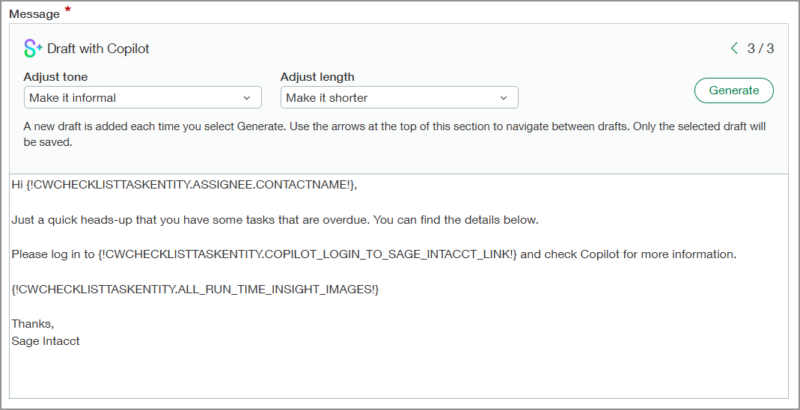
Custom text now used in Copilot-generated email templates: When using the Draft with Copilot feature to create email templates for Close Workspace and Variance Analysis, your custom text is now incorporated into any Copilot-generated content.
Close analytics – Early Adopter: Identify patterns, bottlenecks, and opportunities for improvement, so that you can optimize your close process without manual analysis.
Improved drill-down capability in Close progress monitor: Access details quickly in the Close progress monitor. You can now drill down to task lists from the status tiles and progress chart.
Close Automation now supports multi-base currencies: Accelerate your close process with Close Automation, now available in companies with multiple base currencies enabled.
AI and Automation
Your email domain for AP Automation is changing: On the weekend of February 13-16, all companies will move to the new email domain to support smarter email capabilities.
AP Automation predicts tax details for bills: When you’re subscribed to the Taxes application, AP Automation now predicts tax details on automated bills.
Finance Intelligence agent – Early Adopter: Ask Sage Copilot questions in natural language and the Financial Intelligence agent instantly finds answers using your financial data.
Configure geofencing for time clocks – Sage Intelligent Time – Early Adopter: With permission, the Sage Intelligent Time and Expense mobile app can track the location of employees and confirm where they are when clocking in or out.
Artificial Intelligence data insights in Sage Field Operations: AI capabilities are integrated within the BI Solution Views to help you understand your data faster and more effectively.
Company and Administration
AI‑powered imports: Transform, map, and clean your data using natural‑language prompts, all with instant previews before you import into Intacct.
Introducing Client user type: Designed for Accounting console instances.

Strengthen your email security: The new allowed email addresses list automatically gathers trusted Sender and Reply‑To addresses from the past three months of use.
Improved Manage instances view—Consoles: Added and removed fields from the Manage instances list.
Permission changes: We added new permissions for Fixed Assets Management, Order Entry, and Projects. We also changed permissions for Time—Sage Intelligent Time.
Accounts Payable
Enhanced Pay bills—Early Adopter: Work smarter with advanced filters, dynamic sorting, and expanded capacity for loading bills. Generally available automatically for new companies.
Notifications for recurring AP and AR transaction schedules: Stay informed about upcoming or posted recurring transactions.
Your email domain for AP Automation is changing: On the weekend of February 13-16, all companies will move to the new email domain to support smarter email capabilities.
AP Automation predicts tax details for bills: When you’re subscribed to the Taxes application, AP Automation now predicts tax details on automated bills.
Post AP Advances at the top level for multi-currency companies: Manage AP advances centrally if entities use different base currencies.
Accounts Receivable
Notifications for recurring AP and AR transaction schedules: Stay informed about upcoming or posted recurring transactions.
Embedded Customer Payment Services—Early Adopter: Introducing new ways to accept customer payments directly within Sage Intacct through our integration with Fortis and other payment providers.
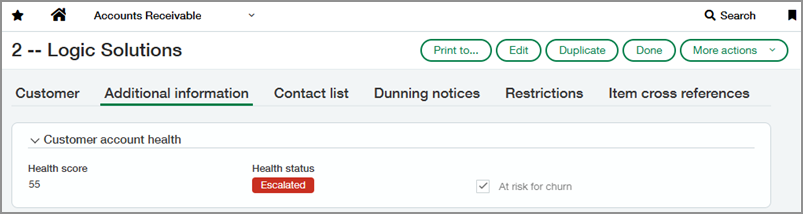
Customer health insights: Track account health, engagement, and risk directly on customer records.
Cash Management
Introducing Cash requirements with expanded currency support—Early Adopter: Gain visibility into expected cash flow requirements.

Enhancements to setting up check printing: Checking printing settings for your company address and logo are now streamlined for simplicity.
Document number now included on bank interest and charges information: Improve accuracy of reconciliation matches with the document number on bank interest and charge transactions.
File import data from Bank transaction assistant now appears on Banking cloud tab: Import data from the Bank transactions assistant file import is now shown on the Banking cloud tab of the relevant account, helping to speed up reconciliations.
Entity location entered automatically on the Bank Register report: To reduce errors when generating the Bank Register report, the entity’s location is included by default.
Vendor Payments powered by CSI to end August 7, 2026: Explore alternative solutions with your account manager or partner.
Contracts
Automate renewal pricing updates: Leverage our new CSV imports or API for automating pricing updates based on CPI.
Revert dimension reassignment: Easily undo the most recent dimension reassignment to correct mistakes.
Expenses
Configure geofencing for time clocks—Sage Intelligent Time—Early Adopter: With permission, the Sage Intelligent Time and Expense mobile app can track the location of employees and confirm where they are when clocking in or out.
Fixed Asset Management
Manage Construction in Progress (CIP) assets: Acquire, track, and capitalize CIP assets seamlessly with AP and Purchasing integrations.
Change asset cost using AP adjustments: Update an asset’s cost directly from an AP adjustment. Unposted depreciation is recalculated automatically for accuracy and ease.
Roll Forward report: Generate a standardized roll forward report with opening and closing balances for asset costs, depreciation, and net book value.
Flexible Asset GL account assignment: Assign the same Asset GL account to multiple asset classifications and use the new Asset classification field on transaction lines for a more flexible workflow.
General Ledger
Announcing GL account reconciliations: Streamline reconciliations by easily matching offsetting debit and credit entry lines.
Streamlined Dynamic Allocations setup for source data: Create allocation definitions that use the source account group as the target of the allocation. This allows you to allocate portions of the account balance across dimensions without changing the overall account balance.

Inventory & Supplies
Flexible selection and reservation of supplies items: Offer your team out-of-stock item substitutions and automatic priority for incoming supplies purchases.
Order Entry
Streamline billing with customer billing groups: Group customers and apply common charges for faster, consistent invoicing.
Planning
Enhancements in Sage Intacct Planning: Sage Intacct Planning (SIP) now includes enhancements that make budgeting faster and more flexible.
Platform Services
Application management—Beta: We continue to make improvements to how you publish, update, and manage application versions for subscribing companies.
Customer health insights: Track account health, engagement, and risk directly on customer records.
Projects and Grants
Manage Projects: The new Manage Projects feature allows you to filter projects and update multiple project fields across projects simultaneously with efficiency and ease.
Connect Projects with Fixed Assets Management CIP assets: This new feature allows you to automatically connect projects to CIP assets for accurate cost tracking and streamlined workflows.

Purchasing
Line-level approvals for Purchasing: Approve, reject, or route individual lines within a purchase requisition or order.
Line-level matching for AP Automation—General availability: With line-level matching, AP Automation predicts line entries based on the vendor documents that you email or upload and flags lines that do not match.
Your email domain for AP Automation is changing: On the weekend of February 13-16, all companies will move to the new email domain to support smarter email capabilities.
Real Estate
Improvements in Sage Intacct Real Estate: These updates improve portfolio visibility and add flexibility to reporting, communication, and billing workflows.
Reporting & Insights
New ICRW and IVE reporting area: The new Cost Type reporting area improves your ability to track and manage Construction projects.
New and enhanced ICRW Report Library reports: The new and enhanced ICRW Report Library reports provide new analytic options for CRE Order Entry Contract Values and increased performance for retainage balance and cost code.
Service Management and Field Operations
Introducing Work Order Management and the work order dimension: Manage service-related work orders at scale with the new Work Order Management application and work order dimension.
Artificial Intelligence data insights in Sage Field Operations: AI capabilities are integrated within the BI Solution Views to help you understand your data faster and more effectively.
Enhanced invoice management in Sage Field Operations: The Invoice Manager now offers advanced filters, giving you precise control over how you view and manage invoice data.

Receive purchase orders from Sage Field Operations: Receiving purchase orders is easier than ever. This update also supports Credit Purchase Orders, so returning items is just as simple.
Sage Expense Management
Expended expense automation capabilities with Sage Expense Management (Formerly Fyle): This solution provides expanded functionality across several areas, including new options for receipt capture, direct credit card feeds for real-time spend visibility, and greater spend policy controls. You’ll benefit from AI-powered expense capture and reconciliations—all using your existing credit cards.
Taxes
Streamlined tax totals in converted transactions: Order Entry and Purchasing transactions with VAT and GST now display net and tax in a single line when you convert them to Accounts Payable and Accounts Receivable transactions.
Configure and run tax box reports—General availability: Define tax report boxes, add those defined boxes to a tax box report template, and run a tax box report from that template to calculate your tax burden for a defined period.
Exemption use codes and reporting location for Avalara AvaTax: Identify tax exempt transactions, maintain accurate transaction history logs, and access location-based tax reporting for your Avalara AvaTax transactions.
Time
Configure geofencing for time clocks—Sage Intelligent Time—Early Adopter: With permission, the Sage Intelligent Time and Expense mobile app can track the location of employees and confirm where they are when clocking in or out.
Sage Intelligent Time settings are now centralized in Time preferences: We’ve added Time settings to the Time preferences page, providing streamlined access to review your settings from one convenient location.
Training & Video
New training and videos: We added new training courses and videos to help you get the most out of Sage Intacct.
User Experience
User interface changes: We updated labels in Accounts Payable, Accounts Receivable, Consoles, Fixed Assets Management, Order Entry, Projects, Purchasing, Supplies Inventory, and Construction WIP Management.
Improved help experience: The help now launches in a browser tab right next to the Sage Intacct tab, giving you full browser functionality for navigating help.
Register for our Sage Intacct newsletter today!
About the Author: Luc Lothamer, CPA