
AR Automation for Sage 100
For organizations running Sage 100, accounts receivable plays a critical role in cash flow and financial stability. Yet many Sage 100 users still rely on manual AR processes—spreadsheets, inbox reminders, and paper statements—to manage collections. As invoice volume grows, these manual methods make it harder to collect payments on time, track customer activity, and forecast cash flow.
Sage 100 AR automation solves these challenges by extending Sage 100 with purpose-built automation designed to modernize the entire invoice-to-cash process. With Sage AR Automation for Sage 100, finance teams can automate collections, improve visibility, and accelerate payments—without replacing their ERP.
What Is Sage 100 AR Automation?
Sage 100 AR automation refers to the use of Sage AR Automation to streamline and automate accounts receivable processes directly within Sage 100. Sage AR Automation is a cloud-based solution that integrates with Sage 100 to eliminate manual AR tasks while preserving data accuracy and financial controls.
Instead of managing collections across multiple tools, Sage AR Automation centralizes customer communications, collections activity, and cash application in one platform that syncs directly with Sage 100 data. This allows AR teams to work more efficiently and consistently as the business grows.
Organizations using Sage AR Automation have reported:
- Lower Days Sales Outstanding (DSO)
- Increased AR team productivity
- Improved cash flow and working capital
View the Sage AR Automation for Sage 100 Datasheet.
Why Sage 100 Users Need Accounts Receivable Automation
Sage 100 provides strong core accounting functionality, but many AR tasks still require manual effort. Common challenges include:
- Sending invoice reminders one customer at a time
- Tracking follow-ups in spreadsheets
- Limited insight into collector activity
- Manual cash application and reconciliation
- Difficulty forecasting incoming payments
These challenges increase risk and slow collections. Automating accounts receivable in Sage 100 allows finance teams to reduce manual work while improving consistency and control.
Key Features of Sage AR Automation for Sage 100
Automated Customer Communications in Sage 100
Sage AR Automation enables automated AR communications for Sage 100 users, including invoice delivery, payment reminders, past-due notices, and statements. Communications are triggered automatically based on invoice status and business rules.
This ensures every customer receives timely, consistent messaging while eliminating paper, spreadsheets, and manual emails.

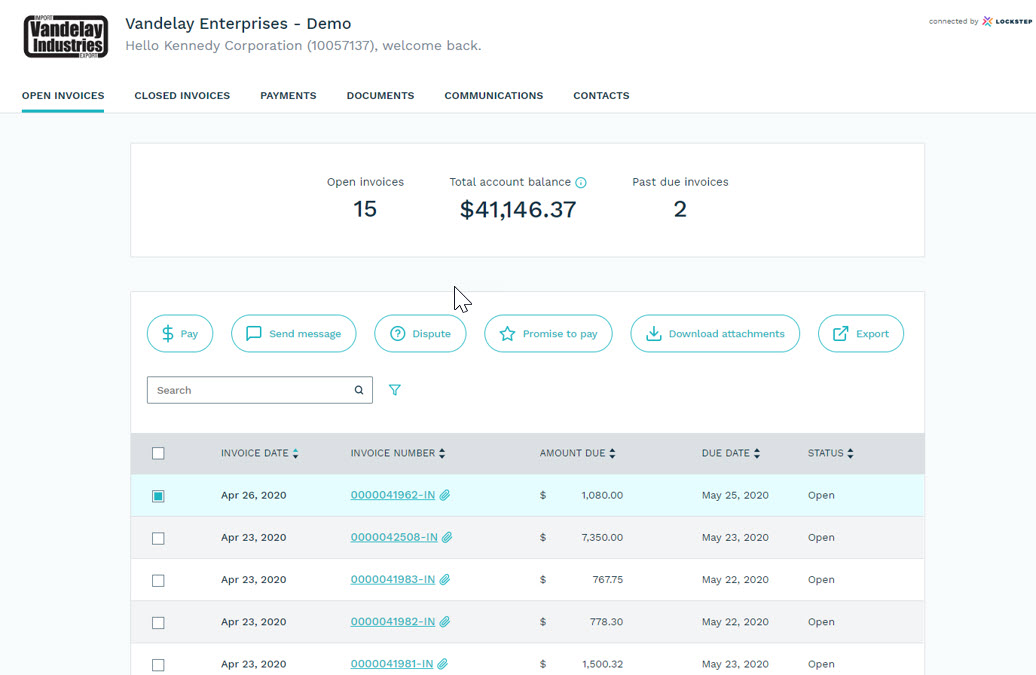
Sage 100 Customer Self-Service Portal
With Sage 100 AR automation, customers can access a secure self-service portal to:
- View invoices and statements
- Make online payments
- Submit inquiries or disputes
- Request documents
Customer self-service reduces inbound emails and phone calls, accelerates payments, and improves the overall customer experience.
Collections Automation and Activity Management
Sage AR Automation provides collections automation for Sage 100 by prioritizing next-best actions for collectors. AR teams can see account history, track promises to pay, log activity automatically, and focus on high-impact accounts.
Managers gain visibility into collector workloads and performance, making it easier to maintain consistent follow-up and manage AR teams effectively.
Automated Cash Application for Sage 100
Manual cash application delays posting and ties up staff time. Sage AR Automation helps Sage 100 users automatically apply payments to open invoices, reducing unapplied cash and freeing customer credit faster.
This improves cash flow while keeping orders moving without manual reconciliation.
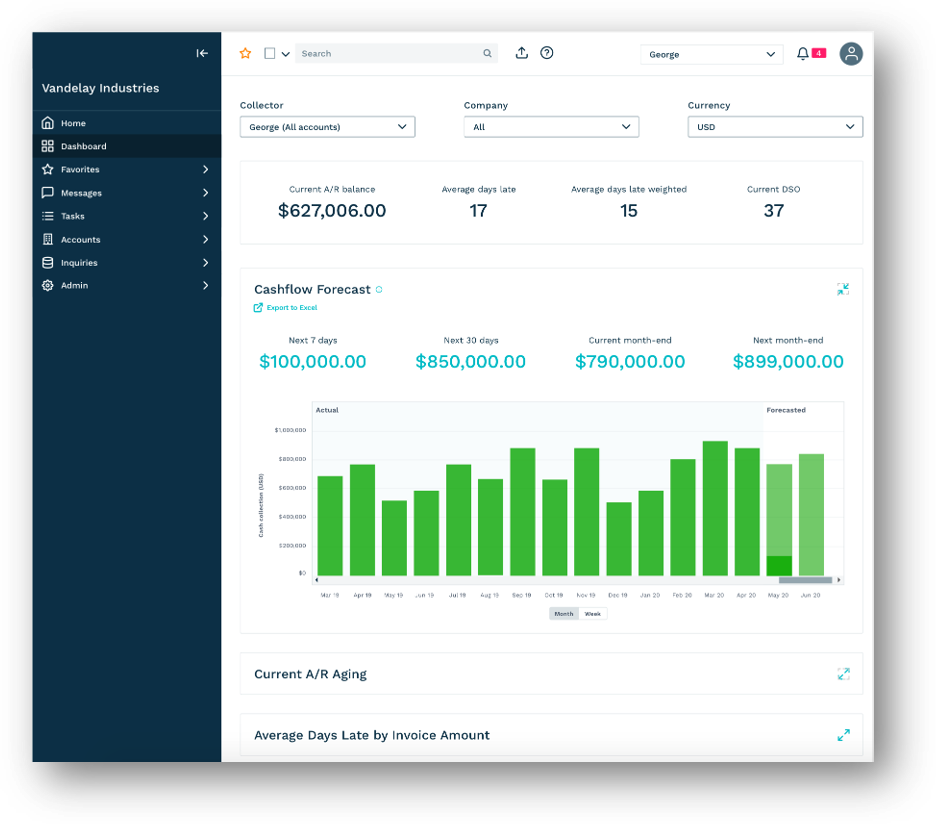
Sage 100 AR Reporting and Cash Flow Forecasting
Sage AR Automation enhances Sage 100 AR reporting with dashboards that provide insight into:
- DSO trends
- Cash flow projections
- Customer payment behavior
- AR team productivity
These insights help finance leaders make more informed decisions and communicate clearly with stakeholders.
Business Benefits of Sage 100 AR Automation
By automating repetitive AR tasks, Sage 100 users can shift focus from chasing invoices to resolving exceptions and strengthening customer relationships. Benefits include:
- Faster collections and improved cash flow
- Reduced administrative workload
- Better visibility into receivables
- Scalable AR processes without adding headcount
Sage 100 AR Automation Plans: Choosing the Right Fit for Your Business
Sage AR Automation for Sage 100 is available in three plans—Essentials, Standard, and Pro—so organizations can align automation capabilities with their AR complexity, transaction volume, and growth goals.
Each plan builds on the one before it, allowing Sage 100 users to start with core automation and expand as their AR needs evolve.
Essentials: Core Sage 100 AR Automation
The Essentials plan is designed for Sage 100 users who want to eliminate manual AR tasks and improve payment speed without adding complexity.
Key features include:
- Automated invoice delivery and online statements
- Online customer payments
- Accounting and email synchronization with Sage 100
- Essential automated reminder sequencing
- Contact and account management
- Notes and communication logs
- Invoice PDF document management
- Dashboards and standard AR reporting
Best for:
Small to mid-sized Sage 100 organizations looking to replace manual reminders, reduce paper processes, and begin automating accounts receivable.
Standard: Advanced Collections and Activity Management
The Standard plan builds on Essentials by adding more advanced tools for AR teams that need greater control, visibility, and performance tracking.
Includes everything in Essentials, plus:
- Goal management for AR teams
- Dispute management and online dispute submission
- Online promise-to-pay functionality
- Enhanced activity management with next‑best‑action guidance
- Credit scoring and risk visibility
- Custom data synchronization options
Best for:
Growing Sage 100 businesses with dedicated AR teams that want to improve collections efficiency, manage exceptions, and gain deeper insight into customer payment behavior.
Pro: Enterprise‑Level Sage 100 AR Automation
The Pro plan is designed for complex or high‑growth organizations running Sage 100 that require advanced configuration, multi‑entity support, and deeper integration.
Includes everything in Essentials and Standard, plus:
- Account hierarchies
- Multi‑entity support
- Multi‑currency and multi‑language capabilities
- Customized and multi‑channel communication sequences
- Advanced document management
- CRM and business intelligence integrations
Best for:
Larger Sage 100 organizations, multi‑entity environments, or businesses with complex AR requirements that need maximum flexibility and scalability.
Scaling Sage 100 AR Automation as Your Business Grows
One of the advantages of Sage AR Automation for Sage 100 is the ability to start with the plan that fits today’s needs and scale over time. As invoice volume increases or AR complexity grows, organizations can expand functionality without re‑architecting their AR processes or replacing their ERP.
This tiered approach allows Sage 100 users to modernize accounts receivable at their own pace while maintaining full visibility and control.
Why Sage 100 Users Choose Sage AR Automation
Sage AR Automation is a Sage-owned solution designed to integrate seamlessly with Sage 100. It enhances your existing ERP investment rather than replacing it, making it a natural choice for organizations looking to modernize AR while staying within the Sage ecosystem.
For growing businesses, Sage 100 AR automation provides a practical, scalable way to improve collections performance and financial predictability.
Is Sage 100 AR Automation Right for Your Business?
If your AR team is spending more time on manual follow-ups than on high-value activities, it may be time to automate. Contact DWD for a demo and pricing.
About the Author: Victoria Vath